Add an applet to your phone
Every applet installs to your home screen like a regular app. It opens full-screen, there's no app store review, and it updates itself every time we ship a change. Takes about ten seconds.
On iPhone or iPad
9:41
aAapps.appletlab.com↻
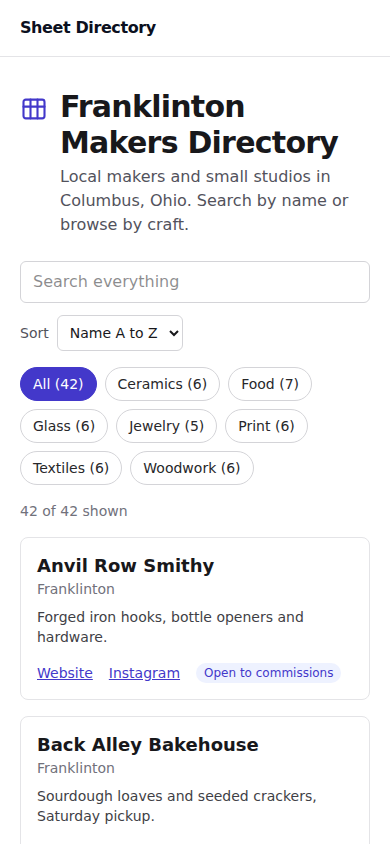
Step 1
Open your applet in Safari
Use the link from your delivery email, then tap Share, the square with an arrow at the bottom.

Sheet Directory
apps.appletlab.com
- Copy
- Add to Home Screen
- Find on Page
Step 2
Tap Add to Home Screen
Scroll down in the share sheet.
9:41
Mail
Notes
Maps
Camera
Music
Health
Weather
Sheet Directory
Step 3
Tap Add, and it's on your home screen
Tap it any time to open the applet.
On Android
apps.appletlab.com
Step 1
Open your applet in Chrome
Use the link from your delivery email, then tap the three dots in the top right.
apps.appletlab.com
- New tab
- Install app
- Share
- Find in page
Sheet Directory
apps.appletlab.com
Step 2
Tap Install app
Chrome offers it from the menu.
9:41LTE
Chrome
Gmail
Maps
Calendar
Photos
Clock
Notes
Sheet Directory
Step 3
It's on your home screen
Opens full-screen, no browser UI.
Why bother?
- Opens full-screen, no address bar, no browser chrome.
- No app store. No review queue. No sign-in to anyone else's account to install it.
- Updates itself. Refresh once after we ship a change.
- Works offline for pages you've already visited (each applet picks what to cache).
Ready to try it? Describe your applet.